


In this article, I’ll discuss the Best TraderSync Competitors for Multi-Account Replay that help traders manage multiple accounts, review past trades, and evaluate trading performance. If you are a trader who wants advanced broker integrations, powerful analytics, automated trade imports and reliable replay tools, then choosing the right platform is key. I will compare popular alternatives based on their main features, account management capabilities, replay functionality, supported markets, and pricing to help traders find a suitable solution for their trading needs.
Why Are Traders Exploring TraderSync Alternatives?
Improved Multi-Account Management: Traders seek a solution that can consolidate multiple brokerage accounts, simplify transaction tracking, and generate consolidated performance reports, without having to log into each trading account individually.
Advanced Trade Replay: Some platforms provide historical chart playback, execution reviews, and customizable replay controls to help traders learn from market conditions and evaluate past trading choices.
Flexible Broker Integrations: Traders prefer platforms that support numerous brokers, exchanges, and prop firms for automated trade imports, reduced manual data entry, and consistent trading records.
Detailed Performance Analytics: Alternative platforms provide specialized statistics, visual reports, win rates, drawdown measurements, and profit analysis, enabling traders to identify weaknesses and enhance their overall strategies.
Affordable Pricing Options: The subscription cost could be a crucial consideration in platform selection. Traders need to weigh free plans, premium features, account restrictions, and pricing models before committing to long-term subscriptions.
Better Asset Class Support: Traders dealing with stocks, forex, futures, options, and cryptocurrencies typically prefer options that support various markets within a single organized trading journal.
Improved Strategy Evaluation: Analyzing historical performance, backtesting, and reviewing trades enables traders to compare strategies, identify recurring errors, and determine which trading strategies consistently produce results.
Custom Trading Workflows: Different traders need different reporting, tagging, account organization and journaling tools, and alternative platforms are attractive for building workflows around individual trading styles and requirements.
Benefits of Multi-Account Trade Replay Platforms
Centralized Account Monitoring: Multi-account replay platforms allow traders to aggregate trading records from multiple brokerage accounts into a single interface, enabling traders to efficiently monitor transactions, review activity, and compare performance.
Improved Trade Analysis: Historical replay gives traders the ability to go back and review past market conditions, assess their entry and exit choices and learn how their execution choices impacted the results of specific trades.
Compare Better Strategy: Traders can compare the same trading strategies across multiple accounts, compare the results, identify differences in performance, and decide which approaches provide more consistent results.
Recognizing Trading Errors By reviewing past trades, traders can spot bad entries, exiting too early, inconsistent position sizing, and recurring errors that can hurt their trading results.
Improved Risk Management: Multi-account analysis helps traders assess exposure, drawdowns, position sizing, and losses across multiple accounts, resulting in more disciplined risk management and capital allocation decisions.
Trade Reviews Save Time: Automated imports and centralized replay tools reduce the need to manually switch between accounts, facilitate historical trade reviews and help traders organize performance information in a single workspace.
Advanced Performance Tracking: Aggregated analytics enable traders to track their win rates, profitability, average losses and trading consistency, making it easier to evaluate their progress across different accounts.
Improved Trading Decisions: Traders can understand past results, assess how effective their strategies have been and make better-informed adjustments to future trading decisions, all thanks to the combination of historical replay and analytics at the account level.
Key Points
- TradeZella – Offers trade replay, backtesting, broker integrations, and performance tracking for active and prop-firm traders.
- TradesViz – Provides advanced trading analytics, multiple account tracking, trade replay, and backtesting features.
- Tradervue – Focuses on trade journaling, broker imports, performance reports, and trade analysis.
- Edgewonk – Offers detailed trading statistics, psychological tracking, performance analysis, and discipline monitoring.
- Trademetria – Supports multi-market trade journaling, broker integrations, account tracking, and customizable performance reports.
- TradeReview – Provides trade journaling, broker imports, performance analytics, and structured trading reviews.
- TradeJournal AI – Combines AI-powered trade analysis, journaling, and performance improvement tools.
- TradingDiary Pro – Offers detailed trade records, account management, reporting, and historical performance analysis.
- UltraTrader – Provides trading journals, performance statistics, and tracking tools for forex and cryptocurrency traders.
- Chartlog – Focuses on chart-based trade journaling, visual trade reviews, and performance analysis
1. TradeZella
TradeZella is an AI-powered trading journal that automates trade logging, performance analysis, and strategy review. It plugs into a load of brokers and prop firms, sucking in trades automatically so traders don’t have to put them in manually. Its Zella AI is able to tag trades and review sessions, identify behavioral patterns such as revenge trading, and develop pre-market plans.
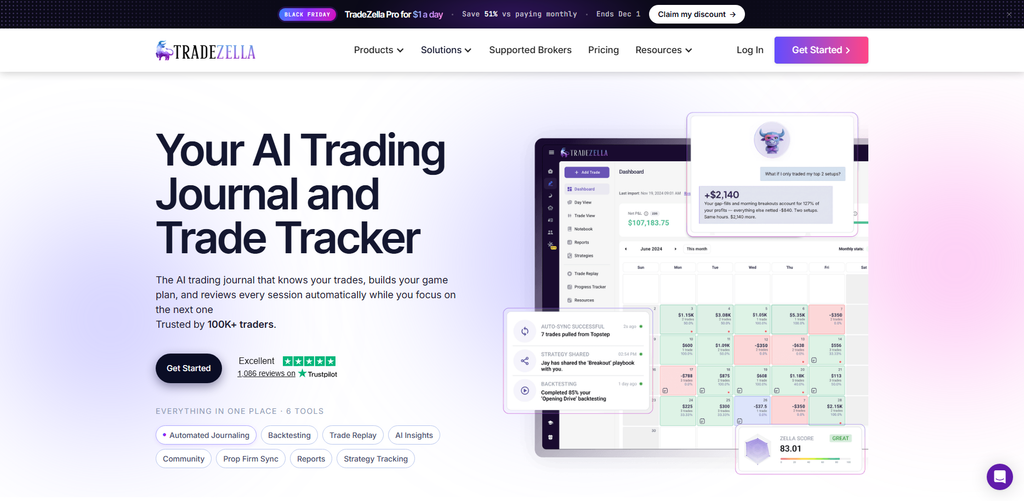
The platform has 50+ reports, customizable dashboards, trade replay, backtesting and prop firm tracking. It supports stocks, options, futures, forex and crypto — making it a good pick for active multi-market traders. TradeZella is perfect for traders seeking automation, AI insights, and in-depth analytics in a single platform.
Main Features
- Imports auto trades from 500+ brokers and prop firms.
- Tick by tick trade replay with adjustable speed.
- Dashboards for multiple accounts and account sync.
- Backtesting historical market data and strategy comparison.
- AI-powered trading insights, performance reporting and trade analysis.
Most Popular Apps
- review trades across several trading accounts.
- Historical replay for analysis of entry/exit time.
- Back-testing trading strategies on historical market data.
- Monitor prop-firm account and trading rules performance.
2. TradesViz
TradesViz is a detailed trading journal and analytics platform for traders who want to customize and analyze data in depth. It has got 600+ statistics, custom dashboards, trade replay, multi-timeframe charts, options tools, simulators, rule based backtesting. With its AI tools, such as AI Coach, AI Query, AI Chat, AI Summary and AI Notes, traders can identify weaknesses and review performance.
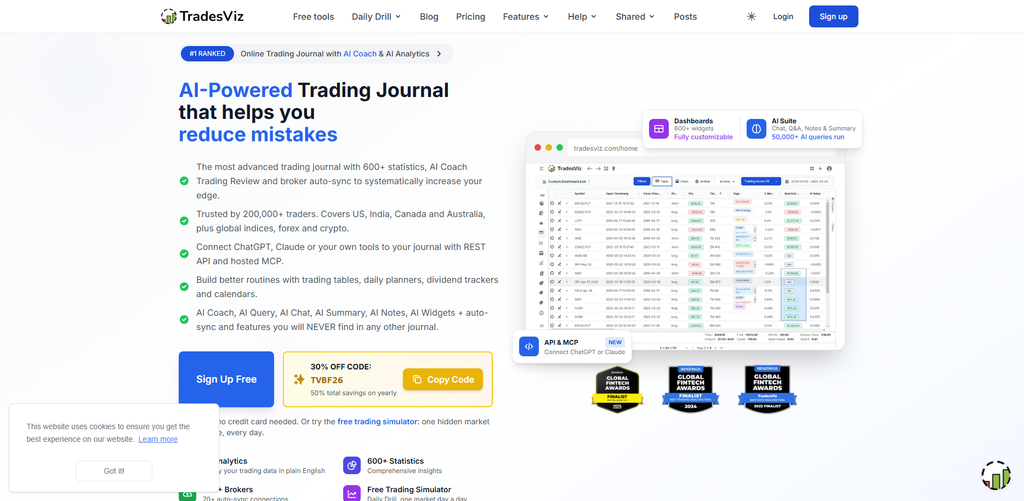
TradesViz supports many brokers with auto-sync and imports, and is especially strong for options, futures, forex, prop-firm and multi-account traders. This is a good option for data-driven traders who want the most control over reports, tags, filters and analysis.
Main Features**
- Supports multiple accounts and currency trading.
- Historical trade replay, second per second.
- Automatic trade synchronization and broker integrations.
- Over 600 analytics charts, statistics and reports.
- Trading simulator, strategy back-testing, AI analysis.
Top Use Cases
- Check trades in several brokerage accounts.
- Simulating historical market scenarios for practice.
- Performance analysis of stocks, options, futures and forex.
- In-depth analysis to find out your trading mistakes.
3. Tradervue
Tradervue is a simple, professional trading journal for importing trades, reviewing charts, taking notes, and generating performance reports. It supports stocks, options, futures and forex with broker imports to minimize manual data entry. Traders can see entries and exits on TradingView charts, add notes and screenshots, tag trades and analyze performance through detailed reports.
Their risk tracking tools help you manage position size and exposure. Its community and mentoring features enable users to share trades and get feedback. Tradervue is particularly good for traders who want a clean and reliable journal with good reporting rather than a very complicated analytics suite
Key Features
- Independent management of trading accounts and import of trades.
- Detailed performance reporting & trade statistics.
- Advanced filters and trade tags you can customize.
- MFE, MAE, risk & exit analysis.
- Study charts, upload images and share trades.
Best Use Cases
- Keeping separate records of trading accounts.
- Comparing performance between trading accounts.
- Looking at win-loss trade patterns.
- Analysis of execution quality and risk management
4. Edgewonk 2.0
Edgewonk is a manual-first trading journal focused on trading psychology, discipline and improving setups. Traders record their trades, add notes and use tools like the Tiltmeter to identify emotional or rule-breaking behavior. The Edge Finder points out profitable set-ups and common mistakes. The Trade Management Optimizer lets you see how different exits might have affected results.

Edgewonk supports many brokers via CSV import and provides you with useful performance reports without heavy reliance on automation. AI-heavy automation is not the best solution for traders who want to improve consistency, control emotions and have a structured review routine
Main Features
- Unlimited journal accounts and importing trades.
- Advanced trading psychology and discipline monitoring.
- Testing of strategies and performance simulation
- MAE , MFE , drawdown and risk analysis.
- Custom trade tags, setup check lists and performance reports.
Best Use Cases
- Performance monitoring across different trading accounts.
- Recognizing emotional trading errors and tendencies.
- Assessing trading strategies and setups profitability.
- Better discipline and better risk control.
5. Trademetria
Trademetria is an all-in-one trading journal, portfolio tracker and performance analysis software for stocks, options, futures, forex, crypto and CFDs. Supports manual entry, CSV uploads, broker files, and API based imports and works with almost all brokers. Useful for keeping detailed records . Traders can track commissions , fees , deposits , withdrawals , dividends , spreads and multiple accounts .

It provides analytics like profit factor, expectancy, win rate, holding time, R-multiples, and long/short performance. Trademetria also provides charts, image journaling, custom templates and REST API access. It will be ideal for traders who need a flexible, accounting style journal with robust multi-market and multi-account support.
Features
- Track and manage your multi-account portfolio.
- Manual entries, CSV uploads and automatic broker imports.
- Customizable trading reports and performance analytics.
- Stocks, futures, options, forex, crypto, CFDs and more.
- Account level charges, deposits, withdrawals and currency tracking.
Best Use Cases
- Consolidate multiple brokerage accounts.- Compare performance by asset class.
- Tracking of portfolio balance and trading costs.- Test strategies with historical trading statistics.
6. TradeReview
TradeReview is a modern trading journal for mobile and web, designed for simplicity, accessibility and everyday trade tracking. It supports stocks, options, forex, futures and crypto, and lets traders sort trades by strategy, market and instrument. It has a dashboard with P&L, win rate, profit factor, equity curve and return metrics and a calendar view showing performance for daily and weekly periods.

Users can log deposits & withdrawals, track trading capital, add notes and sync trades automatically via broker connections. TradeReview is best for traders who want a simple-to-use journal across mobile and desktop without the hassle of managing a complex professional analytics platform.
Key Features **
- Structured trade review & journaling workflow.
- AI based analysis of individual trading performance.
- Tagging, error tracking, and trading notes.
- Review P&L calendar and historical performance.
- Notebook for screenshots, trade ideas and daily thoughts.
Best Use Cases
- Looking at the daily trading activity.
- Seeing mistakes and setups that work.
- Keeping trade notes and screenshots organized.
- Gain insight into trading performance using AI-assisted analysis.
7. TradeJournal AI
TradeJournal AI is an AI trading journal that helps you analyze your trades, notes, rules and behavioral patterns. Imports trades from a selection of crypto exchanges and US brokerages automatically and calculates P&L including fees and funding.

Its AI Coach reviews each trade individually as well as the overall context of the journal and identifies issues such as sizing mistakes, time-of-day bias, rule violations, and repeated losing patterns.
The platform provides a setup playbook, A+/A/B/C grading of trades, pre-trade checklists, TradingView integration, Pine Script generation and customizable dashboards. TradeJournal AI is particularly valuable for crypto traders and traders who want AI input based on their own journal data.
Main Features
- AI assisted journaling and performance review.
- Organization and analysis of the trade history.
- Detection of trading behavior and mistakes.
- Performance reporting and tracking.
- Review and documentation of historical trades.
Best Use Cases
- Organizing trade records and journal entries.
- Review trading decisions and execution patterns.
- Identifying repeated performance gaps.
- Keeping the trading records well-structured.
8. TradingDiary Pro
TradingDiary Pro is a desktop-based trading journal and portfolio-management software for active traders who prefer local data storage and reporting. It supports stocks, options, futures, forex, CFDs, bonds and more, importing trades from 30+ brokers. The software automatically generates positions, groups option legs into strategies and generates performance, risk, net asset value and country specific tax reports.

Each trade can have notes, screenshots and a rich-text journal entry attached. The Gantt view shows timing and duration of positions. Its new MCP feature lets read-only AI assistants query local trading data. TradingDiary Pro is perfect for traders who care about privacy, offline access and advanced portfolio reporting.
Key Features
- Manage multiple trading accounts and portfolios.
- Calculation of profits and accounting in different currencies.
- Distinguish position journals from aggregated trading records.
- Track cash transactions, dividends and fees.
- Trade tagging and performance organization over time.
Ideal for
- Several brokerage accounts and portfolios.
- Diversification of investments in currencies.
- Keeping accurate records of trade history.
- Reviewing portfolio performance and trading costs.
9. UltraTrader
UltraTrader is a mobile responsive trading journal and analytics app for crypto, forex, stocks, commodities and indices. It has automatic imports from Binance, Bybit, MetaTrader 4/5, KuCoin, MEXC, Bitget and more, and also allows CSV imports. The dashboard monitors net P&L, win rate, risk reward ratio, profit factor, expectancy, drawdown and long/short performance.

Traders can add tags, notes, screenshots and custom filters to review setups, mistakes and market conditions. UltraTrader also offers live trade tracking, price alerts, paper trading, trade replay and performance views based on calendar days. It is a great option for traders who want simple multi-device journaling with practical performance analytics.
Main Features
- Transaction and trading activity tracking.
- Keeping trade records organized.
- Historical performance tracking.
- Reporting and trading statistics.
- Handle account level trading data.
Best Use Cases
- Coordination of trade activities.
- Keep records of past transactions.
- Trading performance evaluation.
- Account-level trading information monitoring.
10. Diary
Chartlog is a chart based trading journal. Traders can review executions, strategies and performance within interactive charts. It also supports automatic connections to platforms and trade imports, enabling users to analyze profit factor, win rate, P&L and other key metrics. Each trade can have notes, images, tags, stop losses, targets, custom fields and strategy assignments.

Chartlog calculates risk-reward ratios and maximum excursion data, which helps traders understand price movement before and after their exits. Its journal, table and calendar views make it easy to look back on your daily performance, and higher plans include strategy tracking and custom reports. Chartlog is best for visual traders who want strong trade review based on charts.
Main Features
- AI-assisted screenshot trading journaling.
- AI-powered replay & execution analysis.
- Heatmaps for performance to identify profitable trading timeframes.
- CSV imports, broker API synchronization.
- Pro plan with multi-account support.
Applications
- Review trade entry, exit and risk management.
- Identify profitable market conditions and time to trade.
- Analyze trading behavior with AI insights
- Trade multiple trading accounts through its Pro plan.
Conclusion
Depending on your trading needs, account management requirements, and replay functionality, the right TraderSync competitor for you will vary. TradeZella and TradesViz are dedicated replay and advanced analytics applications, whereas Tradervue, Edgewonk and Trademetria are more trade journaling and performance tracking.
Before choosing a platform, traders should consider broker integrations, supported markets, access to historical data, multi-account capabilities and subscription costs. A good solution can make trade reviews easier, spot recurring errors, improve risk management and provide more insight into trading results. In the end, go with tried and true features that fit your trading strategies and long-term account management goals.
FAQ
TradeZella and TradesViz are notable alternatives offering trade replay and multi-account analytics. Other options include Tradervue, Edgewonk, and Trademetria for journaling and performance tracking.
Traders explore alternatives for better multi-account management, advanced replay tools, flexible broker integrations, detailed analytics, affordable pricing, and support for different asset classes.
Multi-account trade replay allows traders to review historical trading activity across multiple accounts, examine execution decisions, and evaluate strategies using past market conditions.
Important features include account synchronization, historical replay, broker integrations, automated imports, backtesting, performance analytics, supported markets, and subscription pricing.
Yes, some alternatives support multiple trading accounts. However, account limits, synchronization options, and reporting capabilities vary depending on the platform and subscription plan.
